Reflect: Personal AI Relationship Manager

Reflect 💖 is a general purpose multi-agent analysis pipeline that transforms massive, "trapped" chat logs into a single, interactive, and self-contained HTML report. It provides a bird's-eye view of your relationships, memories, and group dynamics, all designed to run privately, efficiently, and at scale. lets see it in action!
1. The Problem: Our Digital Memories are Trapped
In our daily lives, group chats (on WhatsApp, Telegram, etc.) have become our primary "living rooms." They are where we share hobbies, plan futures, celebrate milestones, and build relationships. These chat logs contain thousands of valuable memories, but they are effectively inaccessible.
It's impossible to answer simple questions like:
- What gift would my friend actually like, based on what they've talked about?
- What are the important dates (birthdays, anniversaries) we've all mentioned?
- How has the "vibe" of our group changed over time?
- What topics make our group happy, and which ones cause friction?
A single LLM call cannot process a file with 100,000+ messages. This problem requires a specialized, distributed team of agents.
The Solution: A Multi-Agent Concierge
Reflect acts as your personal chat concierge. You provide a raw .txt export of your personal or group chat, and the agent pipeline analyzes it to produce a beautiful, interactive HTML report featuring:
- Mood Timelines: Line charts tracking members' emotions like happiness, excitement, anger etc.
- Personality Analysis: Diverging bar charts showing positive and negative traits.
- Relationship Webs: Radar charts visualizing the bond strength between members.
- Actionable Insights: AI-generated gift suggestions, topics to discuss, and topics to avoid.
- Calendar Export: A one-click "Download .ics" button for all common important dates.
- Places Timeline: A chronological log of places visited (virtual or physical) or mentioned, perfect for reminiscing or finding future ideas.
System Design
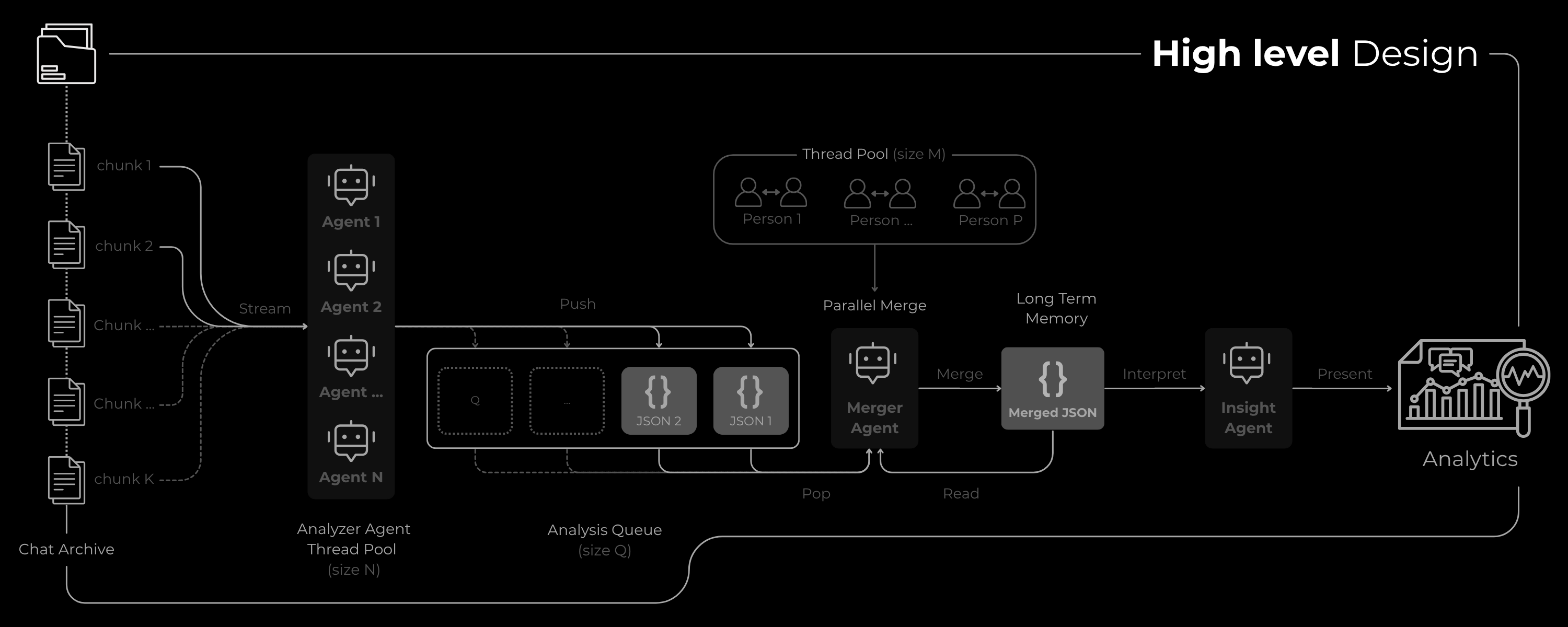
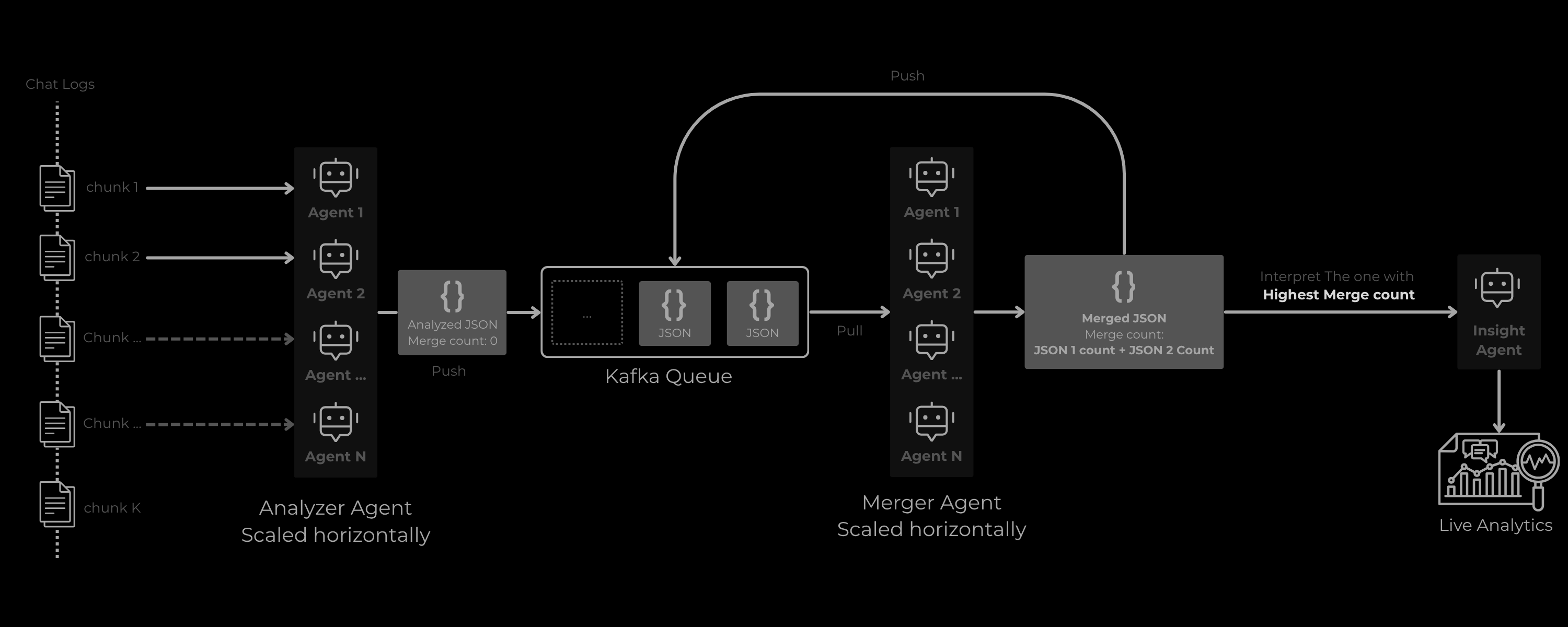
The problem's complexity is solved by a 3-agent pipeline. Each agent has a specific, specialized task, utilizing a common queue for seamless data processing.
Analyzer Agent
The Meticulous AnalystRole: The meticulous data analyst that scans small parts of the chats in parallel with a fixed thread-pool size.
Task: Streams the next chunk of the chat and meticulously extracts raw data (traits, moods, relationships, dates, places) for all mentioned persons. It places the result in a bounded queue for the Merger Agent. Includes built-in Rate Limit retry handling.
Output: Forced by a generation config to return a strict JSON object conforming to a pre-defined schema.
Merger Agent
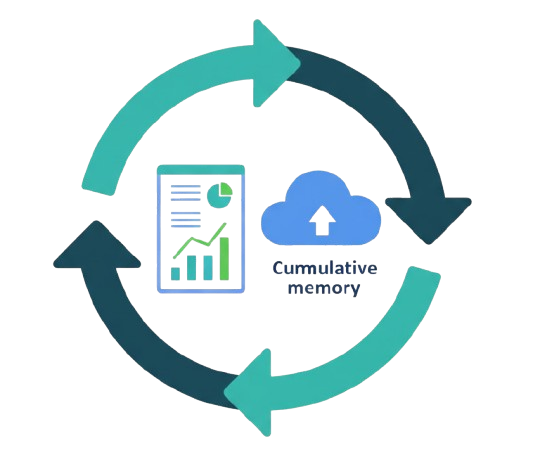
The Data SynthesizerRole: A data synthesis AI that builds the cumulative, "long-term memory" of the system.
Task: As the pipeline processes new chunks, this agent merges the new analysis with the existing, cumulative data.
Logic: Intelligently synthesizes profiles in parallel. It concatenates simple timelines but calculates a new weighted average for quantitative data (like bond_score and trait_percentage). This ensures the final profile reflects the entire history.
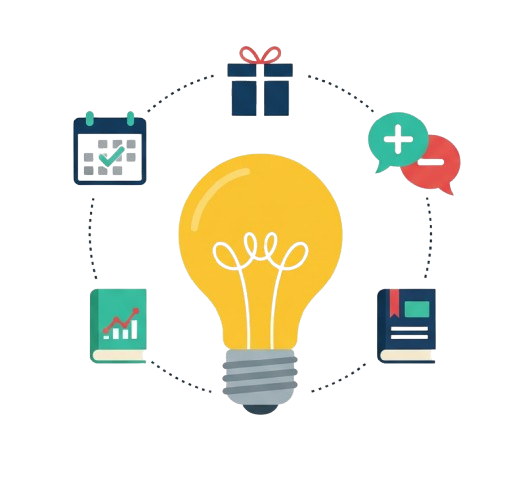
Insights Agent
The Strategic AnalystRole: A high-level strategic analyst that reviews the final, complete picture.
Task: After all chunks are processed, receives the fully merged JSON. Analyzes complete profiles (hobbies, traits) to provide high-level, actionable insights.
Output: A final JSON object containing gift_suggestions, topics_to_discuss, and topics_to_avoid.
3. Why This Architecture is the Right Solution
This multi-agent, chunk-and-merge approach isn't just a workaround; it's the optimal solution for four core challenges in personal data analysis.
1. The Long Context Problem (Solved by Chunking)
- The Problem: LLMs have a finite context window. A 100,000-message chat log (often 5MB+) cannot be processed in a single call.
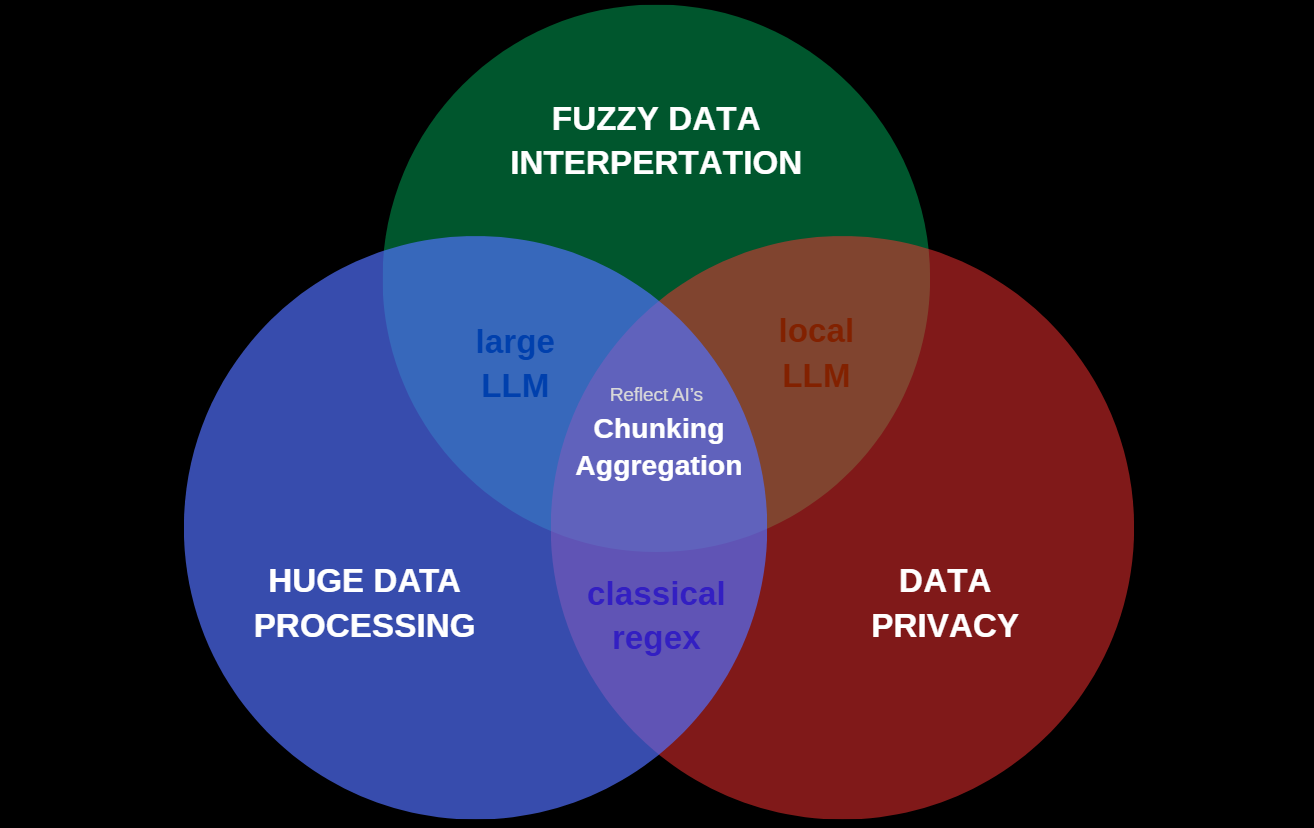
- The Solution: The Chunk Analyzer + Merger Agent combination effectively creates a "stateful" LLM. It processes the log piece by piece (chunking) and intelligently aggregates common factors to build a unified profile, fixing the context window problem.
2. Horizontal scaling
This can be easily Deployed at scale! Analyzer agents can be scaled horizontally analyzing and putting the data in the Queue, and the In memory queue can be replaced with Kafka and Multiple Merge Agents can work in parallel to constantly take 2 JSONs, merge and put back in queue. And finally a Live Analytics that updates when a JSON with highest merge is received
3. The "Fuzzy Data" Problem (Solved by LLMs)
- The Problem: Understanding relationship dynamics is a "non-classifiable search problem." A standard algorithm (
grep, regex, etc.) cannot determine "bond strength" or infer a "bad trait" from sarcastic text. - The Solution: This is precisely what LLMs excel at. The agents use their generalized understanding of human language to extract these "fuzzy" data points (traits, moods, relationships) and, via the JSON schema, structure them for analysis.
4. The Privacy & Compute Problem (Solved by Small Models)
- The Problem: Sending highly personal chat logs to a cloud-based, high-reasoning LLM is a major privacy risk. Furthermore, large models require significant compute resources (RAM, VRAM).
- The Solution: Extracting sentiments, dates, and hobbies does not require strong, complex reasoning. This pipeline is designed to use small, efficient models like
gemini-flash-lite, which can run on standard computers. This means the analysis can be processed locally, ensuring 100% privacy.
Important Note: gemini-flash-lite is not opensource but, alternatives like Llama 3-8B quantized or Qwen-7B quantized can be used as an alternative
4. 🚀 Key Usecases & Applications
This tool provides tangible value in personal, professional, and community contexts.
🤝 For Personal & Professional Relationships
A simple dashboard of important dates and genuinely thoughtful, AI-powered gift suggestions can significantly enhance human bonding. It's a "memory-assist" that helps you be a more thoughtful friend, partner, or colleague.
🗺️ For Travel & Memory Rekindling
The Places Timeline feature, which extracts all mentioned locations, serves as a powerful group memory. It allows members to:
- Find Recommendations: Quickly find that new restaurant, vacation spot, or hiking trail that a friend recommended months ago.
- Plan Activities: Complements the "Gift Suggestions" by providing a list of experiences or places a person has shown interest in, making it easy to plan outings.
- Reminisce: Easily scroll through a log of all the places the group has been or dreamed of going to.
📈 For Team & HR Management
In a professional setting, HR or team leads can (with consent) analyze team chat logs to identify natural "bonding-based" teams, discover potential points of friction, and find topics that boost team morale, leading to a more positive and productive environment.
🌱 For Self-Awareness & Growth
By reviewing an objective analysis of your own chat history, you can identify your own communication patterns. Understanding your "good traits" (e.g., "supportive," "good at planning") and "bad traits" (e.g., "impatient," "dismissive") can be a powerful tool for self-improvement.
📩 For Customer Satisfaction & Analysis
Businesses can use this system to automatically analyze customer chats, support conversations, and user feedback. It extracts sentiment, recurring issues, and highlights moments of delight, making it easier to understand real customer needs.
- Identify support strengths and weaknesses
- Surface hidden complaints or confusion
- Improve overall customer experience strategy
- Automate follow-ups based on detected sentiment or topics
It acts as a continuous customer-insight engine without requiring manual review of thousands of messages.
💬 For Community & Content Management
Moderators of large Discord, Slack, or Telegram communities can use this architecture to get a high-level "vibe check" of their community. It can identify the most positive and negative members, highlight topics that cause friction, and track overall community health over time without reading every single message.
5. 🛠️ Key Technical Concepts
This project is a practical application of several key multi-agent design patterns:
-
Multi-Agent System: A sequential pipeline where the Analyzer, Merger, and Insights agents each perform a specialized, value-add task.
-
Agent powered by an LLM: All three agents are powered by Gemini, using its language understanding and JSON output capabilities.
-
Sessions & State Management: The
final_merged_jsonandmember_tag_mapdictionaries act as the system's "session state" or "short-term memory," which is persistently updated and passed between agents. while the jsons (getting merged) is the long term memory -
Context Engineering: Each agent's system prompt is highly engineered. The Analyzer is forced into a JSON schema, the Merger is instructed to perform "weighted average" calculations, and the Insights agent is given a "compacted" summary to focus its analysis.
-
Parallel Agents: The Analyzer and Merger agents are designed to run in parallel thread pools to dramatically speed up processing of large chat logs. They are sequential but multi-threaded (pub-sub / event driven)
-
Horizontal Scaling: Provided the architecture, this can technically process several Gigabytes or even terrabytes of data without causing OOMs only limited by API rate limit or local agent output speed. With Kafka and multi node setup, it can scale horizontally and speed will no longer be a limitation
-
Observability (Logging): Detailed
print()statements at every step (chunking, merging, filtering, agent calls) provide a clear, real-time log of the agent's actions and state, which is crucial for debugging a multi-step process. -
Agent Deployment (Bonus): As shown in the next section, the entire pipeline is containerized with a
Dockerfileand wrapped in aFlaskserver, ready for deployment on Google Cloud Run.
6. Limitations & Future Work
The current architecture is highly effective for personal and small-to-medium-sized groups. The "Relationship Web" (bond chart) visualization, which involves N-to-N comparisons, would face performance limitations in extremely large communities (e.g., 5,000+ members).
Future work could address this by:
- Using statistical sampling for "vibe" analysis in massive groups.
- Optimizing the N-to-N bond calculation for the visualization layer.
- Fully implementing the Kafka-based streaming architecture for live, continuous analysis.
7. 🧑💻Source Code
8. 🚀 Deployment Documentation
While this agent is designed to be run locally or in a notebook for maximum user privacy you can copy notebook and use your own chat data set, the architecture is also fully prepared for deployment as a web service on Google Cloud Run.
This documentation provides the evidence of a deployment plan as required by the competition for the bonus points.
1. requirements.txt
A file listing the necessary Python packages.
google-generativeai flask
2. Dockerfile
A Dockerfile to containerize the application, making it portable and ready for Cloud Run.
# Use the official Python 3.10 base image
FROM python:3.10-slim

# Set the working directory inside the container
WORKDIR /app

# Copy and install the requirements
COPY requirements.txt .
RUN pip install --no-cache-dir -r requirements.txt

# Copy the Flask app and agent logic into the container
COPY . .

# Expose the port the Flask app will run on (8080 is standard for Cloud Run)
EXPOSE 8080

# Define the command to run the Flask application
CMD ["flask", "run", "--host=0.0.0.0", "--port=8080"]
3. app.py (The Flask Server)
A simple Flask server (app.py) creates a web API. A user can POST their chat.txt file and get the chat_report.html file in return.
import os
from flask import Flask, request, send_file, redirect, url_for
from werkzeug.utils import secure_filename
import google.generativeai as genai

# --- (Import all the agent code from my Kaggle notebook here) ---
# For example:
# from agent_logic import HTMLReportGenerator, analyze_chat_chunk, merge_analysis_json
# --- (This is a simplified example showing the API structure) ---

app = Flask(__name__)
UPLOAD_FOLDER = '/tmp'
app.config['UPLOAD_FOLDER'] = UPLOAD_FOLDER

# (This would be the full main() function from the notebook,
# refactored to take a file path as an argument)
def run_agent_pipeline(chat_file_path):
    # 1. Read chat file
    with open(chat_file_path, 'r', encoding='utf-8') as f:
        full_chat_text = f.read()

    # 2. Chunk text
    text_chunks = [full_chat_text[i:i + 30000] for i in range(0, len(full_chat_text), 30000)]

    final_merged_json = {}
    member_tag_map = {}

    # 3. Run Analyzer + Merger Agents
    for chunk in text_chunks:
        # new_analysis_json = analyze_chat_chunk(chunk)
        # ... (full pipeline logic) ...
        # final_merged_json = merge_analysis_json(final_merged_json, new_analysis_json)
        pass # Placeholder for the full agent logic

    # --- Mock data for deployment example ---
    final_merged_json = {
        "persons": [{"name": "Test User", "hobbies_interests": [], "good_traits": [], "bad_traits": [], "relationships": [], "places_visited": [], "mood_timeline": []}],
        "common_important_dates": []
    }
    # --- End mock data ---

    # 4. Run Insights Agent & Generate Report
    # report_generator = HTMLReportGenerator(final_merged_json)
    # report_filename = report_generator.save_report("chat_report.html")
    report_filename = "chat_report.html" # Mock filename

    # Create a dummy report file for this example
    with open(report_filename, "w") as f:
        f.write("<html><body><h1>Test Report</h1></body></html>")

    return report_filename

@app.route('/', methods=['GET'])
def index():
    # A simple form to upload the file
    return '''
    <!doctype html>
    <title>Upload new Chat File</title>
    <h1>Upload your chat.txt file</h1>
    <form method=post action="/analyze" enctype=multipart/form-data>
      <input type=file name=chat_file>
      <input type=submit value=Upload>
    </form>
    '''

@app.route('/analyze', methods=['POST'])
def analyze_chat():
    if 'chat_file' not in request.files:
        return "No file part", 400
    file = request.files['chat_file']
    if file.filename == '':
        return 'No selected file', 400

    if file:
        filename = secure_filename(file.filename)
        temp_path = os.path.join(app.config['UPLOAD_FOLDER'], filename)
        file.save(temp_path)

        try:
            # Run the agent pipeline
            report_filename = run_agent_pipeline(temp_path)
            # Send the generated HTML file back to the user
            return send_file(report_filename, as_attachment=True)
        except Exception as e:
            return str(e), 500

if __name__ == "__main__":
    app.run(debug=True, host='0.0.0.0', port=int(os.environ.get('PORT', 8080)))
4. Deployment to Google Cloud Run
With these three files, the agent can be deployed from a terminal using the Google Cloud SDK:
# 1. Build the container image using Cloud Build
gcloud builds submit --tag gcr.io/[PROJECT-ID]/reflect-agent

# 2. Deploy the container to Cloud Run
gcloud run deploy reflect-agent \
  --image gcr.io/[PROJECT-ID]/reflect-agent \
  --platform managed \
  --region us-central1 \
  --allow-unauthenticated \
  --memory=2Gi